How a Fake Bahrain Civil-Defense App Turns a Phone Into a Listening Post
TL;DR: Throughout July and including the day that this article is being published, Gulf states, including Bahrain and Kuwait have been activating civil-defense sirens and public-safety guidance for residents in the wake of Iranian missiles. During active air-defense events, official emergency-alert applications see sharp spikes in install demand.
Some actors treat that demand as a distribution opportunity.
On July 17, Dream researchers analyzed an Android application that impersonates a Bahraini Civil Defense “BH Alert” siren app. It is distributed through a network of look-alike domains that clone the Google Play Store and official Bahraini government sites, complete with fake install animations and ad-tracking pixels, and it deploys a four-stage surveillance platform capable of harvesting lockscreen credentials, SMS and one-time codes, contacts, and screenshots, running banking-app overlays, and taking full remote control of the device. It relies on social engineering and the abuse of legitimate Android permissions, delivered under a public-safety brand at a moment when users are primed to install it. It is the second emergency-alert app our team has analyzed and dismantled this year.
The pattern is worth another word. High-adoption civilian applications, the ones people install because a government or an international body told them to, combine three things an operator wants:
- Mass distributiom
- Implicit trust
- Permission profile that overlaps almost exactly with surveillance tooling.
Impersonating one of these apps in the middle of a live conflict is one of the most efficient ways to be trusted on a target’s device. The malware does not have to break anything. It just needs to impersonate an official app to be granted access, and fear does the rest.
What follows is the full technical analysis. The analysis was static: we reconstructed the sample from the outer packer to the command protocol without executing it or contacting its infrastructure. Where a finding rests on confirmed code and where it rests on inference, we say so.
Delivery Infrastructure
The campaign impersonates real Bahraini public institutions to establish trust with victims. Across four captured landing pages, the actor poses as Bahrain Civil Defense, the Ministry of Interior, and the Information & eGovernment Authority inside high-fidelity Google Play storefronts. Government publisher labels, 100K+ download counts, fabricated reviews, and Data Safety claims make the application appear established. Air-raid, shelter, and emergency-alert language creates pressure to install quickly.
The Install button triggers a timer-driven 20 MB download hosted outside Google Play, alongside a false “Verified by Play Protect” claim. The page then displays simulated “Installing” and “Installed” states before delivering an APK directly. The analyzed outer sample was collected through download[.]alert-bh[.]com. A separate custom variant at download[.]bh-security[.]com uses the same 11.9-second sequence before requesting /BH-Alert[.]apk. Clicking the resulting fake Open button downloads the file a second time.
Two delivery vectors were observed:
- Variant A - Google Play impersonation. The pages at playgoogle[.]alertbh[.]com and download[.]alert-bh[.]com are byte-for-byte identical SingleFile copies of a real Google Play listing. They run the full 11.9-second fake installation sequence before downloading the payload from bh-alert[.]com. A third domain, download[.]alertbh[.]info, also masquerades as Google Play but skips the animation and serves the APK immediately from the same origin.
- Variant B - Bahraini public institution impersonation. The page at download[.]bh-security[.]com masquerades as an official Government of Bahrain site. It loads an external script, assets/js/app.js?v=3, which tracks the Install click as a Meta Lead event, reuses Variant A’s 11.9-second animation, and then requests the same-origin /BH-Alert[.]apk.
The delivery kit is designed for reuse across domains: the fake-install sequence is a portable, same-origin drop that runs unmodified on any domain. Source comments inside it label the sequence as a “fake-install animation,” instruct the maintainer to place the APK beside index.html, and note that the relative path will work on any hosting domain. The custom variant (B) additionally records PageView and Install-as-Lead events through Meta Pixel 1688111402450882.
The initial distribution vector was not established during this analysis; no delivery mechanism to victims was observed directly. Based on patterns seen in prior emergency-alert impersonation campaigns, smishing links and links shared through social media and messaging apps are the most likely channels.


Technical deep dive
Analysis summary
The investigation identified a four-stage Android malware chain disguised as a Bahrain civil-defense and UNDRR (United Nations Office for Disaster Risk Reduction) “BH Alert” application. The first APK uses a custom RC4 shell to expose a coercive installer. That installer presents emergency-alert branding, requests VPN and unknown-source installation approval, deliberately disrupts most device traffic, and installs a second APK hidden as payload.base. The nested APK contains another RC4 shell that loads the final OctagonPanel/Ward RAT. The payload guides the victim through accessibility, default SMS and dialer, contacts, notification, battery, and OEM autostart permissions, then establishes an AES-GCM-protected TCP session and provides continuous UI surveillance, phishing overlays, lockscreen credential theft, SMS and contacts collection, screenshots, application discovery, remote UI control, and resilient persistence.
The embedded configuration identifies an encrypted C2 endpoint, the passphrase octagon-default-key-change-me, protocol version 2, and build ID DevLRT. All primary execution paths support delivery, privilege acquisition, surveillance, credential theft, persistence, or remote control. The large, bundled libraries in both APKs are decoy content rather than a benign application path.
C2 host, port, and lure URLs are held internally and are not reproduced here.
Campaign overview and execution flow
The app poses as an official civil defense application, using bilingual (English/Arabic) content that impersonates Bahrain Civil Defence and the Ministry of Interior, with references to UNDRR adding false legitimacy. Framed as a “siren alert” setup, it walks users through a sequence of permissions that appear necessary for emergency alerts but actually serve two real goals: getting the payload package (com.kisa.octagonpanel) installed, and securing the privileges needed for persistent surveillance.
This malware has a multi-stage architecture:
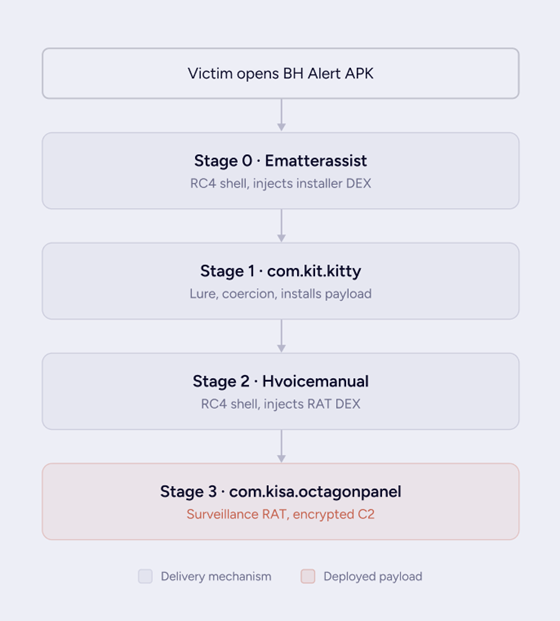
Figure 3: The four-stage delivery chain, victim tap through the deployed payload.
The end-to-end sequence runs as follows:
- Outer shell executes. Module named Ematterassist. The native Android attachBaseContext copies and decrypts ZfChs.ttf, extracts two executable bytecode DEX files, and inserts them into the active classloader.
- Lure renders. com.kit.kitty.MainActivity displays Bahrain and UNDRR branding and uses a JavaScript bridge to drive the native permission and installation chain.
- VPN denies connectivity. After VPN approval is granted by the user, FenrirVpnService captures device traffic without forwarding it, and a persistent installation reminder returns the victim to setup.
- Child APK installs. Once unknown-source installation permissions are granted by the user, PackageInstaller writes the 2nd stage payload.base as base.apk, commits the session, stops the VPN on success, and launches com.kisa.octagonpanel.
- Nested shell executes. Hvoicemanual decrypts the 3rd stage (ZGdSEl.jar), extracts two more DEX files, and injects the persistent RAT (OctagonPanel) implementation.
- Privileges are acquired. A guided chain requests battery exemption, OEM autostart, accessibility, default SMS and dialer roles, contacts, SMS, and notifications.
- Steady state begins. Ward and Guard services start, watchdogs and fake sync register, and WardClient connects to the embedded C2 over the encrypted Guardian/Ward protocol.
Installation
Stage 0 — outer shell: decrypt before the user interface
The application declares com.old.stem.Ematterassist as its Application subclass, so this class is instantiated before any activity, service, or UI component exists. It overrides attachBaseContext, a lifecycle callback that runs even earlier than onCreate(), giving it the earliest possible execution point in the app’s lifecycle.
During this early initialization, the app creates a private storage directory and locates a bundled asset at item/ZfChs.ttf, an asset masquerading as a font file. Ematterassist.d copies the asset out using a 3 MiB buffer and reads it back into memory. The bytes are then passed to Ematterassist.a, which implements a standard, unmodified RC4 stream cipher (KSA/PRGA) with a hardcoded key referred to as ct.
Decrypting this asset shows it is a ZIP archive containing classes.dex and classes2.dex — compiled Android bytecode in standard Dalvik/ART format. The disguised font file is in fact a second, self-contained application payload. Ematterassist.b extracts the archive, and c.b.a.a.d then uses Java reflection to merge the resulting dexElements into the process’s DexPathList, the internal structure the Android classloader consults to resolve code — reflection being necessary since this manipulates internal fields with no public API equivalent. Once merged, the hidden dex code is fully loaded into the running process and callable as though it shipped with the original app.
The sample also contains logic aimed at going further than simply loading additional code: a routine invoked as f(““) that resolves android.app.ContextImpl and android.app.LoadedApk and accesses their internal fields — mOuterContext, mPackageInfo, mApplication, mActivityThread — which together determine which Application object the framework treats as active for the process. This is a more invasive technique aimed at replacing the entire visible Application instance with the hidden payload’s own. However, f is invoked with an empty string in place of an expected class name, which likely prevents the final substitution (”splice”) from completing in this build.
This failure doesn’t meaningfully limit the payload, since the dex merge into the classloader has already occurred by the time this routine would run. The hidden code is already resident in the process and reachable through the app’s declared launcher activity, regardless of whether the Application-object substitution succeeds.
Stage 1 — BH Alert social engineering
com.kit.kitty.MainActivity creates a WebView with JavaScript, DOM storage, and file access enabled, and registers a bridge object, WebAppInterface, under the name Android so that embedded page content can call directly into native app code. The loaded content is bilingual and presents itself as a Bahrain civil-defense siren alert service. This content is used to precondition the victim, walking them through a narrative that primes them to accept subsequent VPN, package-installation, accessibility, and default-SMS-app requests.
Selecting “Start setup” invokes Android.onUpdateClick, the bridge method exposed to the WebView. The app first checks whether com.kisa.octagonpanel is already installed; if so, it launches that target directly, skipping the setup flow entirely. Otherwise, it proceeds through the following sequence:
- Request notification permission where required by the platform.
- Request the user’s consent to establish an Android VPN.
- Start FenrirVpnService.
- Open the MANAGE_UNKNOWN_APP_SOURCES settings screen.
- Poll canRequestPackageInstalls() every 300 ms until the permission is granted.
- Read assets/payload.base into memory.
- Write it to a full-install PackageInstaller session.
- Commit the install through a custom broadcast, com.kit.kitty.PACKAGE_INSTALLED.
- Stop the VPN and launch the installed target after success.
payload.base is already a valid APK. The installer performs no decryption or transformation on it before writing it into the package session, unlike the RC4-encrypted payload in the first sample, where this asset is delivered and installed as is, with the .base extension serving only to avoid the obvious .apk naming.
VPN blackhole as coercion
FenrirVpnService presents itself as a functioning VPN but does not actually relay any traffic. It assigns the address 10[.]0[.]0[.]1/24, installs default routes for both IPv4 and IPv6, and advertises DNS servers 1[.]1[.]1[.]1 and 8[.]8[.]8[.]8, giving the tunnel the outward appearance of a normal, working VPN connection. Selected messenger and social applications, along with com.kit.kitty and com.kisa.octagonpanel themselves, are excluded from the tunnel and continue to route normally.
All other traffic on the device is forced into the TUN interface. The tunLoop reads each packet as it arrives, but processPacket always returns null, so nothing is ever written back out. The practical effect is selective network denial: every app other than the excluded set silently loses connectivity, while the attacker’s own apps keep working, making the device appear broken to the victim without blocking the attacker’s channel. An ongoing “Complete the installation” notification is kept visible throughout, steering the victim back to the setup lure. As a fallback, the tunnel automatically stops itself after 15 minutes if setup has not been completed by then, restoring normal connectivity and presumably preserving the pretext for a retry.
Stage 2 — nested shell: hiding the final payload
The installed child package names biz.rely.melt.Hvoicemanual as its Application. Its shell is structurally equivalent to Ematterassist, with renamed fields and values:
Decryption yields classes.dex (approximately 9.5 MB) and classes2.dex (approximately 1.5 MB), containing the com.kisa.octagonpanel.* package hierarchy. The package manifest already declares the RAT’s full component surface, including its accessibility service, foreground service, guard component, SMS/WAP handling, fake-sync mechanism, and overlay components. The shell’s role here is narrower than it might first appear: it hides the implementation code within the encrypted dex files, but it does not hide the installed component surface itself, since those components are already declared and visible in the manifest.
OctagonPanel/Ward operation
Configuration and privilege acquisition
MainActivity invokes OctagonConfig.applyDefaultsIfFirstRun. Default configuration values come from res/raw/config.json, or hardcoded fallback values if that file is unavailable, and are persisted into the SharedPreferences file octagon. The relevant settings include the C2 host, port, and passphrase, anti-removal modes, battery and OEM-specific options, default SMS and dialer behavior, watchdog configuration, silent audio playback, and wakelock usage.
The activity then prepares a hidden WebView loaded with the stage-3 lure URL and initiates an ordered permission chain:
- Battery-optimization exemption.
- Vendor-specific OEM battery and autostart settings.
- WardAccessibilityService.
- Default SMS role.
- Default dialer role.
- READ_CONTACTS.
- Receive, read, and send SMS permissions.
- Notification permission.
The activity tracks its waiting state across each settings screen and advances the chain when the victim returns to the app. TreeInspector.suspend temporarily pauses aggressive UI monitoring during these transitions, presumably to avoid interfering with or being disrupted by the OS’s own settings screens. Once the full chain completes, the app reveals the hidden lure WebView, starts WardForegroundService, and enables ServiceWatchdog.
Service startup and C2 lifecycle
WardForegroundService enters the foreground state under the notification text “Updating…”, a generic label designed to avoid drawing the victim’s attention. It acquires a partial wakelock and a high-performance Wi-Fi lock to keep the device and network active even while idle, and may loop a zero-volume audio track, R.raw.silence, likely as an additional mechanism to discourage the OS from suspending the process. It starts and binds GuardService in a separate process, :guard, registers a fake sync adapter, and installs receivers for network connectivity, screen on/off, and doze-mode state changes, giving it visibility into and resilience against the conditions under which Android would normally throttle background activity.
The service constructs a WardClient using the configured C2 host, port, and passphrase, along with a ward identity, display name, version, and build ID. WardClient.connectAndServe opens a TCP socket, sends an initial WardHello message, starts an outbound writer thread, emits a WardPulse heartbeat every five seconds, and reads framed commands from the C2 server, referred to internally as “Guardian” commands, dispatching each one through a listener implemented by the accessibility service, which is where these commands are ultimately executed on the device.
OctagonCipher encrypts this traffic using AES in GCM mode with no padding. The 256-bit key is derived by taking the SHA-256 hash of the UTF-8-encoded passphrase, and each frame uses a unique 12-byte nonce along with a 128-bit authentication tag, which is a standard, correctly implemented use of authenticated encryption rather than a custom scheme. If the connection fails, the client rotates through an operator-provided pool of fallback addresses and retries with backoff, giving the C2 channel resilience against any single host or port being blocked or taken down.
RAT architecture and data flow
Once permissions are granted, Android accessibility APIs provide visibility into active windows and the ability to perform global or node-level actions. The service layer keeps that capability available across screen, network, sleep, process, and reboot events.

Figure 4: RAT architecture and data flow: the accessibility hub, the collection-and-control capabilities, and the persistence layer.
Steady state
Once accessibility, services, and C2 are active, the device continuously reports foreground applications, UI trees, node events, screen state, SMS, contacts, applications, clicks, watcher events, and captured credentials. The operator can issue UI actions, launch applications, request screenshots, display phishing overlays and notices, configure watchers and click triggers, and replace fallback infrastructure.
Capabilities and Operational Impact
Continuous interface surveillance. WardAccessibilityService.onAccessibilityEvent coalesces node events, reports foreground packages, records configured clicks, dispatches watcher events, and periodically serializes getRootInActiveWindow(). The serialized tree includes text, hints, bounds, focus state, and password flags. Impact: the operator can reconstruct what the victim sees and does across applications, including sensitive forms and authentication workflows.
Lockscreen credential theft. LockscreenPasswordCapture recognizes PIN-pad and pattern-cell clicks, text changes, window transitions, masked input, and notification signals. Successful capture emits WARD_PASSWORD_CAPTURE (38) or WARD_PATTERN_CAPTURE (39). Impact: device-unlock secrets can be stolen and reused for physical or follow-on access.
SMS, WAP, and contacts collection. SmsReceiver forwards live SMS delivery and receipt, WapPushReceiver handles WAP push, and HeadlessSmsSendService supports respond-via-message. Guardian requests trigger bulk SMS history and contacts reads. Becoming the default SMS application increases interception reliability. Impact: the operator can obtain private communications, contact graphs, and one-time authentication codes.
Screen capture and application discovery. Guardian commands request screenshots, installed-application inventory, foreground-package updates, and screen state. Screenshot capture uses accessibility or MediaProjection-supported paths. Impact: the operator gains visual evidence of sensitive sessions and an inventory for targeting high-value applications.
Phishing overlays and attacker-controlled prompts. When the foreground package matches the operator-controlled gate list, WardAccessibilityService.handleForegroundChange launches GateOverlayActivity. The activity loads bundled or remotely configured HTML and returns submitted values as WardGateAnswer. It is excluded from recents and uses an empty task affinity. PushAlertActivity supplies a second operator-triggered notice path. Impact: the malware can impersonate selected banking or account applications at the moment the victim opens them and collect submitted credentials.
Remote UI control. Guardian commands can perform global or node accessibility actions, launch packages, configure click triggers and watchers, dim the screen, show notices, and update gate templates. Results return as WARD_ACTION_RESULT (49). Impact: the operator can manipulate applications with the victim’s privileges, automate transactions or settings changes, and conceal activity behind overlays or dimming.
Persistence and process resilience. BootReceiver starts Ward and Guard services after boot and package replacement. ServiceWatchdog combines AlarmManager, WorkManager, and expedited restart paths. GuardService runs in a separate process and rebinds or restarts the main service. Fake authenticator, sync-adapter, and content-provider components create a sync heartbeat. Power, dream, phone-state, time, and Wi-Fi receivers feed back into startup paths. Wakelocks, a high-performance Wi-Fi lock, silent audio, and a system-looking LocationManagerService wakelock tag improve survival on aggressive OEM firmware. Impact: termination of one process or a device reboot is unlikely to remove operator access without uninstalling the application and revoking its roles.
Summary:
Evasion and anti-analysis
Archive and code concealment
- Both APKs use poisoned ZIP metadata designed to disrupt standard archive and APK tooling.
- Two separate RC4-encrypted shells conceal the installer and the final payload implementation.
- Encrypted containers are disguised with misleading file extensions, such as .ttf and .jar.
- Runtime DEX insertion avoids exposing the complete execution path to the initial classloader.
- Application-splice reflection conceals the handoff through Android framework internals.
Noise and misleading content
- Dense blocks of junk integer updates and opaque branching logic surround the functional packer statements.
- Encoded strings obscure reflection targets.
- Cyrillic lookalike characters are used as separators in asset paths, complicating path handling and analysis.
- Large amounts of Koolmesh, Superwall, SVG, and commercial-library code are bundled as decoy volume but are never selected as the active application path.
Runtime stealth
- The stage-3 lure WebView stays hidden until privilege acquisition is complete.
- TreeInspector.suspend reduces monitoring artifacts while Android system settings are visible.
- The foreground service displays generic “Updating…” text to avoid drawing attention.
- Phishing overlays are excluded from the recents screen and detached from normal task affinity.
- Huawei and Honor builds use the system-styled wakelock tag LocationManagerService to blend in with legitimate system processes.
- anti_remover and anti_remover_moni provide defensive monitoring around removal attempts.
Runtime DEX insertion avoids exposing the complete execution path in the initial classloader. These measures increase the cost of extraction, obscure the true entry path, and minimize the signs visible to the victim during operation. A signature scan against the outer APK, for instance, would have matched a font file rather than executable code. The full chain only resolves once each stage is decrypted, and the classloader is followed — the same process used to recover it for this analysis.
Limitations and confidence
- The analysis was static only. No APK, decrypted DEX, or sample-derived artifact was executed.
- No C2, lure, DNS, or other sample-derived indicator was contacted. Current reputation and availability require approved passive verification out-of-band.
- Poisoned ZIP metadata prevented a conventional APK workflow. Tolerant extraction and manual archive handling recovered the analyzed code, but malformed packaging may hide additional archive edge cases.
- Ematterassist.f(““) receives an empty class name. The intended framework splice is evident, but successful runtime replacement was not dynamically demonstrated.
- Guardian can receive additional fallback hosts and ports; embedded infrastructure is not necessarily exhaustive.
- Early indicators, including Cyrillic Russian artifacts in the packaging, point toward a Russian-speaking developer, but we see no evidence of nation-state involvement. An external “HQWar” label was not corroborated in code, and we make no campaign operator, victimology, or broader attribution claim.
Attribution
Several code artifacts point to a Russian-speaking actor. Beyond the Cyrillic Russian strings noted above, both installed packages share a naming pattern: com.kit.kitty and com.kisa.octagonpanel, where kisa is a Russian nickname for “kitty” (from киса). The repeated theme across otherwise unrelated package names is consistent with a Russian-speaking developer.
What this means for defenders
The exposure here is not a single application. It is a category of trusted civilian software that shares a permission profile with surveillance tooling, distributed to citizens at national scale, at exactly the moment fear reduces user scrutiny. During active conflict, install demand for public-safety apps rises sharply, which compresses the window in which a malicious clone can reach scale. Addressing that means treating the category as part of the national attack surface, and reconstructing complete attack chains from individual samples quickly enough to support a defensive response.
Appendix A: Indicators of compromise
The outer sample’s fuzzy hashes were retained from the prior draft and are not part of the table above: ssdeep 393216:a/WEjaEYEdI3GjGOB1/zoFW1775wKoisdp/9bp3Gdw:a9aWjGO7/MFiuT39; tlsh T16827220AEFC4BA3AC9F75232197B59194C474C414787D983DD59382C2CBB6E1AB1EBC8. The nested sample is assets/payload.base inside the outer APK; its fuzzy hashes were not recorded. Flag if these should be dropped.
Appendix B: MITRE ATT&CK (Mobile)
Normalize technique labels to the ATT&CK Mobile version your organization consumes.
Appendix C: Detection opportunities
Device and EDR analytics
- Alert when com.kit.kitty installs com.kisa.octagonpanel, followed by accessibility enablement and default SMS/dialer role changes. Detect a VPN that installs default routes but produces no forwarded traffic while excluding itself and a second package.
- Correlate an “Updating…” foreground notification with a Ward foreground service and a :guard process.
- Detect accessibility services that serialize UI trees and launch task-hidden WebView overlays.
- Hunt for APKs containing ZfChs.ttf plus payload.base, or ZGdSEl.jar plus octagon-default-key-change-me.
Network analytics
- Passively monitor for repeated TCP sessions to the embedded C2 with roughly five-second heartbeats and AES-GCM-sized framed payloads.
- Treat the embedded endpoint as one lead. Guardian type 65 can add or replace fallback host and port pairs.
- Do not actively probe sample-derived infrastructure.
Appendix D: Ward/Guardian protocol catalog
Inbound Guardian commands:
Types 2 and 4 provide Guardian hello/session and pulse handling. Type -1 closes the session; reason BANNED stops the client. Type -16 reports an error to the listener.
Selected outbound Ward messages: